Cube ID
The Cube ID is a Remote ID module that broadcasts information about UAVs. It uses a Bluetooth 5.2 dual-mode unit.
The Cube ID is FCC and CE certified, ensuring compliance with international standards.
Legal disclosure from manufacturer
This device complies with Part 15 of the FCC Rules. Operation is subject to the following two conditions:
(1) this device may not cause harmful interference, and
(2) this device must accept any interference received, including interference that may cause undesired operation.
NOTE: This equipment has been tested and found to comply with the limits for a Class B digital device...
- Reorient or relocate the receiving antenna.
- Increase the separation between the equipment and receiver.
- Connect the equipment into an outlet on a circuit different from that to which the receiver is connected.
- Consult the dealer or an experienced radio/TV technician for help.
FCC Radiation Exposure Statement
This equipment complies with FCC radiation exposure limits set forth for an uncontrolled environment.
This equipment should be installed and operated with a minimum distance of 20cm between the radiator and your body.
This transmitter must not be co-located or operating in conjunction with any other antenna or transmitter.
Default UAS ID Configuration.
By default, the drone is configured with the following UAS ID parameters:
- UAS ID: The specific serial number of the drone (unique to each drone).
- UAD ID Type:
Serial_Number - UA Type:
Multirotor
These parameters are pre-configured to ensure compliance with standard drone identification protocols. The UAS ID is unique to each drone and corresponds to its specific serial number, while the UAD ID Type and UA Type are set to Serial_Number and Multirotor, respectively.
Operation Settings Before Flight.
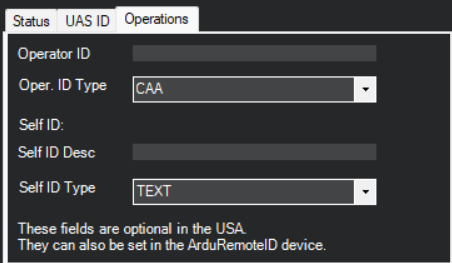
Before flight, it is necessary to configure the Drone ID and Operation Information in Mission Planner. Follow these steps:
-
Connect to Mission Planner:
-
Establish a connection to the drone using Mission Planner.
-
Navigate to the Drone ID tab.
-
-
Configure the Following Parameters:
-
Operator ID: Enter the operator's unique identification number.
-
Oper ID Type: Select the type of operator ID (e.g.,
FAA Registration Number). -
Self ID DESC: Provide a description of the drone's purpose or mission.
-
Self ID Type: Select the type of self-identification (e.g.,
Text Description).
-